Did you see...

perfectreplica.io High Quality Best submariner replica Watches Online For Sale All of our Rolex watches are carefully selected.

Working with Lightroom 3 Vignettes

28/01/2011

For this tutorial we take a look at how the Post-Crop Vignette feature in Lightroom 3 helps us to add a bit of style to the image, but more importantly, it also helps to direct the viewer’s [More]

Apply a “Pinch Curve” to Tighten a Layer Mask

27/01/2011

Howdy & Hello! As Photoshop continues to improve, our digital workflows become more efficient as we replace old techniques with new features. How many of you have embraced the Refine Edge dialogue commands, or the Adjustment & Masking panels? If you've been reading Michael Hoffman's articles here at TipSquirrel there should be no doubt about the usefulness of those improved features. What happens when you're put in front of an older version of Photoshop WITHOUT those cool new features? A smart person has TipSquirrel bookmarked because you never know when you'll need an old school technique. Let's take a look at how to use a "pinch curve" to choke in a layer mask in Photoshop. [More]

Wood Inlay in Photoshop

26/01/2011

  Recently my fellow Photoshop Nut, Gavin Hoey, posted a great tutorial on an Out of Bounds effect that I loved. Just for fun, I decided to use the technique on an old photo and change the [More]

Creating a Duotone Image in Photoshop

25/01/2011

Yesterday, Richard Hales began an introduction to Black and White images. In conjunction with that, I wanted to present an oldie-but-goodie technique that you can use to spice up your black and white [More]

An Introduction to Black and White

24/01/2011

When I first started out on this series of tutorials on black & white conversion techniques I started to think about how black & white photography has changed since the advent of digital and [More]

Photoshop CS5 Best New Features In-Depth

21/01/2011

Photoshop CS5 is packed with new features and here regular Nut Rich Harrington demonstrates the very best. Taking us through Mini Bridge, Puppet Warp, and a whole host of other great new features [More]

Making a Moody Sky even Moodier with Photoshop

20/01/2011

On my own blog recently I posted a photograph I’d taken of a guy riding a Harley Davidson motorcycle and went on to explain that on the day of the shoot there wasn’t a single cloud in the sky. In [More]

Capturing Details with Refine Mask

18/01/2011

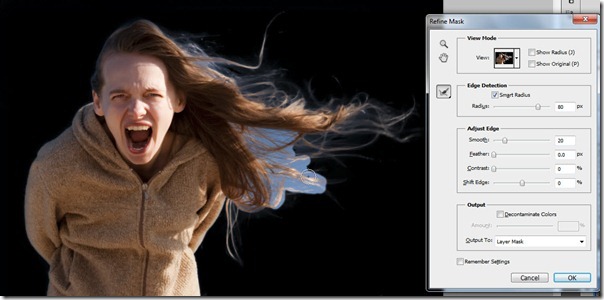
Last week on TipSquirrel, I introduced the Masks Panel, and today we’re going to take a closer look at an old feature that is new again with CS5. A few versions ago, Adobe introduce the Refine Edge [More]

Join Photos to Make Text in Photoshop CS5

14/01/2011

Here’s a great little technique that makes use of one of the best new features that Adobe added in Photoshop. It’s called mini bridge and as the name suggests it’s the little brother of the [More]

Using Shadows and Highlights Nondestructively in Photoshop

13/01/2011

The Shadows/Highlights adjustment allows you to perfect local areas of contrast in your scene, but unfortunately there is not currently an Adjustment Layer for Shadows/Highlights. Instead we'll create a Smart Object layer and integrate the adjustment into that layer (as a Smart Filter) so that we can revisit the settings as many times as we need to after saving the document. [More]

Colour Correction using Lab Colour mode

12/01/2011

Last month, Scot showed how to boost colour contrast using the Lab colour space. This week he stays within LAB, and looks at a simple colour correction. The original image is a mix of flash and a rather warm background light, creating a mixed balance of light throughout the image. [More]

Using the Photoshop Masks Panel

11/01/2011

In the past several tips I’ve explored ever more deeply into the art of creating selections. Of course, one of the primary uses of selections is to create a mask, in order to non-destructively hide [More]
1 54 55 56 57 58 80
3-9