Did you see...

Articles by Michael Hoffman

About Michael Hoffman (224 Articles)
Mike has been a photographer, artist, educator, and technophile for most of his life. Early in his career, he created technical illustrations and photographs for electronic equipment manufacturers, and taught classes in computer aided drafting and 3D modeling software. When digital cameras became widely available in the late 1990s, the move was a natural one, and has led to a happy combination of technology, software, photography and art. Mike is an Adobe Certified Expert in Photoshop and Acrobat, and is well versed in Lightroom and Photoshop Elements, as well as Illustrator and InDesign. He has also contributed his time and efforts to the excellent work being done by Operation Photo Rescue, in restoring photographs damaged by natural disasters. As an active member of the National Association of Photoshop Professionals, he continues his quest for excellence in art, excellence in design, and excellence in education.

3D Text Video Animations in Photoshop CS6

08/05/2012

This will be a two part tip, and in today's video we will focus just on creating the reflective text, using image-based lighting. Stay tuned for next week's follow up, in which we'll learn how to animate the text and add even more lighting effects, all with the new power of video editing in Photoshop CS6. [More]

Creating Dashed and Dotted Lines in Photoshop

24/04/2012

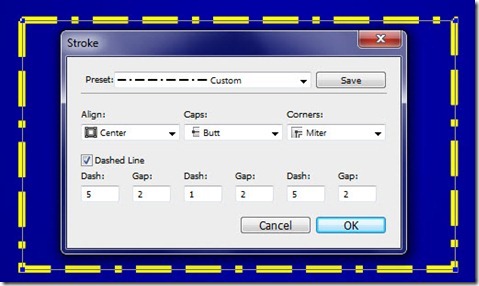
The more I play around with Photoshop CS6, the more I like all the great new capabilities that have been added to this amazing program. Did you know, that in Photoshop CS6, shape layers are a thing of the past, replaced in their entirety by vector layers? This is a tremendously powerful feature, which we will explore in detail over many tutorials in the future. For today, we’ll focus on a small new feature, but one which solves a big problem that has existed forever in Photoshop – how to create a dashed or dotted line. [More]

Type Tips for Photoshop CS6

17/04/2012

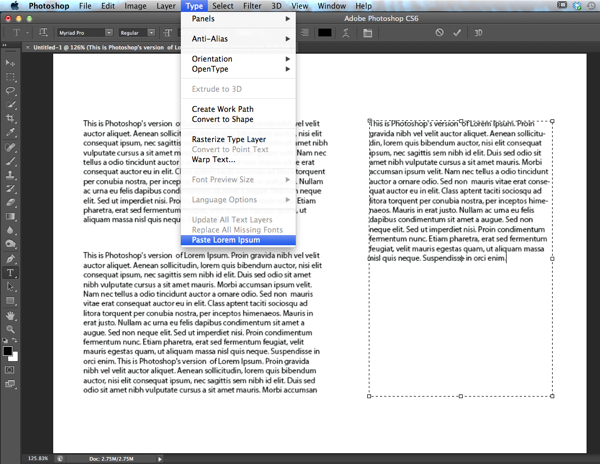
Photoshop CS6 comes with a few type tricks up its sleeve, and if you find yourself working with type a lot in Photoshop, especially if you are mocking up print layouts or web pages, you're going to get a lot of mileage with these new features. Let's take a look. [More]

Photoshop’s Enhanced Filters in CS6 Beta

03/04/2012

With Photoshop CS6, Adobe really integrated GPU acceleration into many of the filters, adding some great new ones along the way. The GPU, or Graphics Processing Unit, is a powerhouse that lives on our graphics cards and allows Photoshop to perform amazing feats of pixel manipulation. [More]

Color Lookup Adjustments with Photoshop CS6 Beta

27/03/2012

In Photoshop CS6 Beta, Adobe has given us an entirely new type of adjustment, complete with its own new adjustment layer category. Watch this video to learn about Color Lookup adjustments and how they can transform your image colors quickly, easily, and non-destructively. [More]

Introduction to 3D features in Photoshop CS6 (beta)

22/03/2012

Photoshop CS6 is now available as a beta release from Adobe Labs, and it is nothing short of amazing. It will take a long time to work through all the new and improved features, so today, I’m focusing on the one area I’m most excited about: the 3D engine. 3D in Photoshop keeps getting better, and the developers have taken things up several notches with this new release. Count on seeing a lot more of the new 3D features, as well as the myriad of other new and improved features within Photoshop CS6 beta, in the coming weeks here on TipSquirrel. [More]

Photoshop Compositing with 3D (Part 2)

20/03/2012

In this two part video tutorial, we look at creating a surreal scene with 3D and traditional 2D elements. In this second part, we add the 3D elements and explore ways of integrating the 2D and 3D parts into a unified whole. [More]

Photoshop Compositing with 3D (Part 1)

13/03/2012

In this two part video tutorial, we look at creating a surreal scene with 3D and traditional 2D elements. In this first part, we set the scene by compositing various landscape elements together to provide the backdrop for our 3D model. [More]

Solids of Revolution with Photoshop CS5 Extended

06/03/2012

Photoshop CS5 Extended can create solids of revolution, but the technique is a little bit obscure, and requires wrestling with the Repousse interface. Watch this video to see how to create a revolved 3D solid, to render it with reflections, and to integrate it into a 2D background. [More]

Simplify Your Lightroom Interface

28/02/2012

One of my favorite features of Adobe Photoshop Lightroom is the user interface. More specifically, the ability of the user interface to mold itself to the activities at hand, and its ability to get [More]

Mixer Brush Tips

21/02/2012

With Photoshop CS5, Adobe brought us the Mixer Brush, which, along with the new Bristle Brushes, are perhaps the biggest makeover in the brush engine since version 7.0. In today’s video tip, you’ll learn a few basic techniques for setting up and using Mixer Brushes – including the often overlooked capability of loading your brush with multiple colors at one time. Happy painting! [More]

Take Control of your Photoshop Brushes!

14/02/2012

Are you tired of the hunt and peck method of finding your favorite Photoshop brushes? Learn to organize and save your favorite brushes with Preset Manager. With you could save an entire palette of brushes with color and opacity preset? You can, and today we'll see how using Tool Presets. [More]

Camera Raw Workflow Tips

07/02/2012

In today’s video tip, you won’t learn how to create or apply cool develop settings to make your images look amazing. What you will learn is how to set or change your Camera Raw workflow, how to understand when and why unusual things are happening in Camera Raw, and ways to gain speed and efficiency with your Camera Raw workflow [More]
1 6 7 8 9 10 15