Did you see...

perfectreplica.io High Quality Best submariner replica Watches Online For Sale All of our Rolex watches are carefully selected.

Photoshop

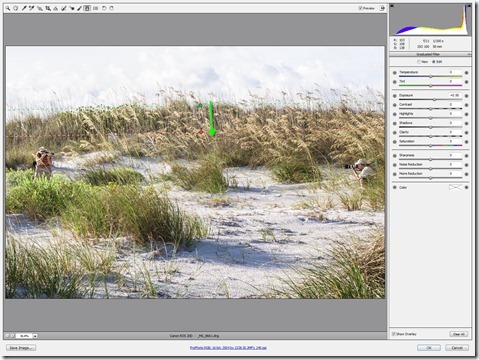
Dramatic Skies with Camera Raw’s Graduated Filter

12/06/2012

On a recent Saturday morning, I was privileged to join some fellow NAPP members for a friendly “Canon vs. Nikon” shootout, at Fort Desoto Park in Saint Petersburg, Florida. The original intent was to compare the new 5DMIII against the new D800. Out on the beach, things got a little crazy, and a few of us took the term “shootout” literally! I was on hand to capture some of the hilarity. [More]

Reviving Afternoon Skies with Photoshop Multiply Mode

08/06/2012

Dealing with overly bright skies is a challenge photographers of all stripes must deal with on a regular basis. We've all been there: on vacation, in a great spot, just a few hours to photograph but sunrise and sunset are not an option. So we photograph our subjects when the sun is overhead, showering everything in blue light. Skies suffer the worst sometimes, with areas that are partially blue and others partially blown out or too bright. The shot below exemplifies this. [More]

12 Courses, 2 Nuts and 7 Days Free at Lynda.com

04/06/2012

Hi, Eric here with a slightly different post. I’m sending you off somewhere else! Today I’m offering you the chance to head off and get 7 days of free UNLIMITED ACCESS to all the courses at lynda.com. [More]

32 Bit HDR in Photoshop

25/05/2012

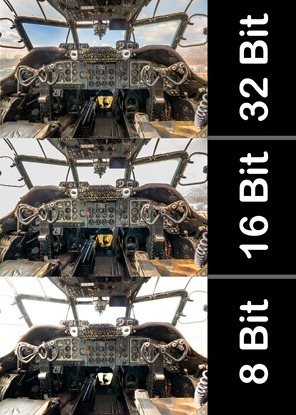
HDR, love it or hate it there’s no getting away from the fact that sometimes your camera can’t capture all the tones in a high contrast scene that you see. At that point you’ll need to take more than one image and blend the exposures together and create a more realistic (or surrealistic) image. [More]

The Navigator Panel in Photoshop

24/05/2012

While there are various tools, and plenty of methods for panning & zooming an image my favorite is still the Navigator Panel. If you're not in the habit of customizing your workspace or moving the panels around, you've probably never given the Navigator Panel much thought. At first glance it doesn't look all that impressive, but the trick is using it with a second monitor while sizing it really large. [More]

Photoshop CS6 Vector Fun

22/05/2012

With the new Photoshop CS6, we finally have vectors that have fill and stroke properties, and this gives us much more power and flexibility with our designs. In this video you’ll see the basics of creating a new vector object, modifying the fill and stroke properties, adding pixel-based effects to your vector object, and blending the object with your background. [More]

Coloring With Photoshop – Skin Pt. 2

16/05/2012

When last we saw our heroine she was looking a little, well, colorless. Today we’re going to perk things up a bit with a little help from history. First, we need to ask ourselves a couple of questions; what era is our image from and what era’s style do we want to borrow from? Of course, you can color your images any way you like, but personally, I like to borrow styles from the era the image was taken in. For the really old images that may mean striving for a watercolor or pastel look of a hand tinted image and portraits taken in the 40’s may call for the more saturated, glamorous style of that era. I’ll go more into the styles of each era and inspiration at a later date, but for now, since the image I’m working on was taken in the 40’s, you can go online and find an image or images from that era that appeals to you in terms of skin and hair color. You may feel like it’s wrong to borrow an image, but It’s okay to use these images for this purpose – all you’re going to do is sample color palettes, you’re not using the image or reproducing it in any other way. [More]
Photoshop Color Range Selections

11/05/2012

One of the best ways to make selections in Photoshop CS4, CS5 and CS6, is with the Color Range command. This is especially true for photos that have areas of contiguous color that are [More]

3D Text Video Animations in Photoshop CS6

08/05/2012

This will be a two part tip, and in today's video we will focus just on creating the reflective text, using image-based lighting. Stay tuned for next week's follow up, in which we'll learn how to animate the text and add even more lighting effects, all with the new power of video editing in Photoshop CS6. [More]

Next Photoshop Evangelist

30/04/2012

I’d like to thank everyone that gave their support to me during the recent Photoshop Evangelist Competition. Sadly we didn’t quite make it coming second by 110 votes to Nicole Dalesio. [More]

Photoshop CS6–The Small Stuff

27/04/2012

Photoshop CS6 brings us a whole raft of new and exciting tools to play with and it’s also stuffed full of major improvements. We even get some new filters to play with too. But once you’ve been using the Photoshop CS6 for a while you’ll start to notice lots of small changes. In fact Adobe have made dozens and dozens of little tweaks and enhancements that will probably never make the headlines but may well be incredibly useful. [More]

Creating Dashed and Dotted Lines in Photoshop

24/04/2012

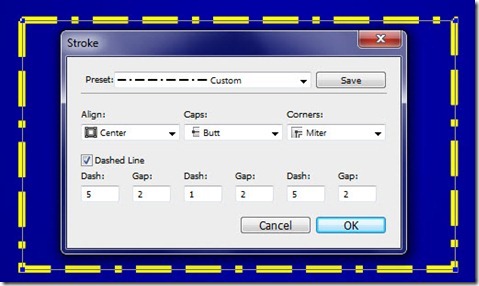
The more I play around with Photoshop CS6, the more I like all the great new capabilities that have been added to this amazing program. Did you know, that in Photoshop CS6, shape layers are a thing of the past, replaced in their entirety by vector layers? This is a tremendously powerful feature, which we will explore in detail over many tutorials in the future. For today, we’ll focus on a small new feature, but one which solves a big problem that has existed forever in Photoshop – how to create a dashed or dotted line. [More]
1 19 20 21 22 23 45
3-9