Did you see...

perfectreplica.io High Quality Best submariner replica Watches Online For Sale All of our Rolex watches are carefully selected.

Search Results for Selection

Apply a “Pinch Curve” to Tighten a Layer Mask

27/01/2011

Howdy & Hello! As Photoshop continues to improve, our digital workflows become more efficient as we replace old techniques with new features. How many of you have embraced the Refine Edge dialogue commands, or the Adjustment & Masking panels? If you've been reading Michael Hoffman's articles here at TipSquirrel there should be no doubt about the usefulness of those improved features. What happens when you're put in front of an older version of Photoshop WITHOUT those cool new features? A smart person has TipSquirrel bookmarked because you never know when you'll need an old school technique. Let's take a look at how to use a "pinch curve" to choke in a layer mask in Photoshop. [More]
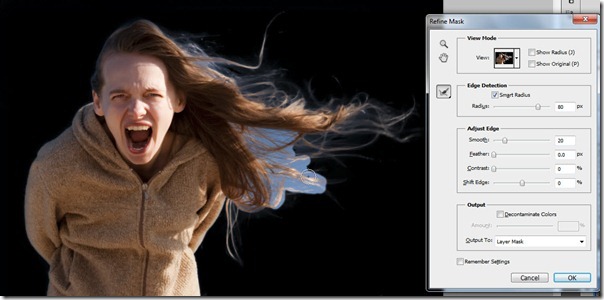
Capturing Details with Refine Mask

18/01/2011

Last week on TipSquirrel, I introduced the Masks Panel, and today we’re going to take a closer look at an old feature that is new again with CS5. A few versions ago, Adobe introduce the Refine Edge [More]

Using the Photoshop Masks Panel

11/01/2011

In the past several tips I’ve explored ever more deeply into the art of creating selections. Of course, one of the primary uses of selections is to create a mask, in order to non-destructively hide [More]

Selecting with Color Range

04/01/2011

One of the most powerful and useful tools for creating a selection in Photoshop is also the most often ignored and the least understood. In fact, it generally isn’t even regarded as a tool at all, [More]

Stripy Text with Photoshop Layer Styles

01/12/2010

More text antics with Photoshop. We shall try and create this… Step 1. Start by creating a new Photoshop Document, I used 1024×768 at 72 ppi, but as always its really up to you. I then set [More]

Working with type on a path

16/11/2010

Back in the days before Photoshop CS, type on a path was the domain of Adobe Illustrator. With CS, and every version since, Adobe added type on a path to the arsenal of tools available to Photoshop [More]

Page Curl Effect with Photoshop

12/11/2010

I love Photoshop for many reasons. One of those reasons is the huge number of filters, effects and actions that come built in as standard. Great as Photoshop is, there are a few things that Adobe [More]

Photoshop Exploding Text (Sort Of)

03/11/2010

I’d like to continue my TS tutorials with a text effect I like, its fairly simple but looks effective. Step 1. We start by making a 1000×1000 pixel document – we have to have a square [More]

DVD Review : Photoshop Essential Training

25/10/2010

Regular readers of TipSquirrel.com and certainly those that follow TipSquirrel on Twitter, will be aware of Stuart Little and A Little Photoshop. In the first incarnation of this blog I would report [More]

Adding a Vignette Layer with Photoshop

07/10/2010

Vignettes are a bit of a Marmite addition to an image, you either love them or hate them. However, if used carefully they can be a useful tool to help lead the viewer’s eye to an area of a [More]
1 8 9 10 11 12 14
3-9