Did you see...

perfectreplica.io High Quality Best submariner replica Watches Online For Sale All of our Rolex watches are carefully selected.

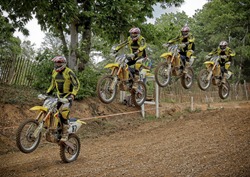
Use Photoshop for a Seamless Action Sequence

24/08/2012

Technically an action sequence is a series of photos merged together to show the progression of an object through the frame. Artistically an action sequence is brilliant way to show movement in your photos and make amazingly eye-catching images. [More]

Duelling in Lightroom, Working With 2 Screens

22/08/2012

One of the great reasons to use Lightroom is that it offers such a fast and easy workflow for editing large numbers of images. Every little tip, trick or method that saves editing seconds allows us to be more effective and profitable as photographers. My tip for today is using Duel Screens in Lightroom. The ability to work on one image while controlling a batch of images means that you can work quicker and more consistently allowing for more time doing what we love.. spending more time out with the camera. [More]

Photoshop Signature Brushes and Shapes

21/08/2012

Whether you want to watermark your images, or just an a tasteful signature for artistic flair, there are several ways to accomplish this in Photoshop. In this tutorial, we’ll look at two ways to create a signature that can be applied over and over – one method using Photoshop’s Brush Engine, and the second using Photoshop Custom Shapes. [More]

Photoshop Transform Tips and Tricks

20/08/2012

In this video I explore the uses of the Photoshop Transform command to help lay out the framework for a dartboard. The transform command is used to correctly space all the wires and to keep all the circles concentric. [More]

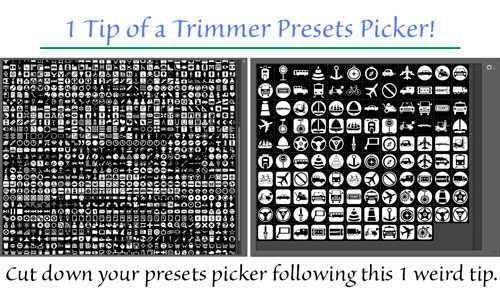
Taming your Photoshop Presets

17/08/2012

Do you suffer from unsightly, bulging panels? Are your pickers bursting at the seams? Would you like to shed a few hundred items but still be able to enjoy a healthy choice of custom presets? [More]

19th Century Beauty Experiment

15/08/2012

What makes portrait photography so much better today than it was in the 19th century? Because, let’s face it, most of those folks didn’t look their best. Was it the lighting? Lack of make-up? The equipment? I imagine all of the above played a part, along with the fact that the subject had to sit up to 15 minutes due to the exposure time, hence no smiles. The lighting, especially at first, was quite harsh. In the beginning limelight was used, which resulted in extremely white, chalky faces, and later, battery operated arc lamps which were also quite stark. Later, around the turn of the century, full walls of windows were often used, taking advantage of daylight, as well as electric light. Even though the renaissance masters figured out how to harness and soften light to paint by (Rembrandt used shutters and a white cloth hanging over the windows to diffuse light), photographic portraiture wouldn’t reach that level until much later in the game. [More]
Book-Cover Composite Themes with Photoshop

14/08/2012

Using some quick compositing techniques, you can create a series of book covers, CD covers, artwork, or related graphical designs that look different, yet share a common feel and theme. This video tutorial uses Photoshop CS6, but the techniques apply to any recent version of Photoshop. [More]

Adobe Creative Cloud – First Impressions

13/08/2012

You may be looking to get a new Creative Suite package and have heard about the Creative Cloud, so what is it and should you subscribe to it? In short, the Creative Cloud is a collection of Adobe [More]

Fixing Chromatic Aberration in ACR 7.1

10/08/2012

Shortly after Photoshop CS6 was released, Adobe provided a very useful update to users of the Camera Raw plugin: brand new tools for removing CA or chromatic aberration! CA is the fancy term given to the fuzzy "color fringes" that we often see, in shots taken under bright light. Just zoom in between 100-300%, and as you pan around the subject, check the high contrast edges. Subjects shot against a bright skies or lights are particularly vulnerable to displaying CA. Fortunately there's a very easy solution in Camera Raw 7.1 that requires only a few clicks. Let's take a look. [More]

Use Photoshop to Add Some Cloud

08/08/2012

Sometimes a blue sky is lovely, especially when you're trying to get a tan :) but sometimes you may want to add some clouds to that perfect sky – it may make things more interesting. That's easily achieved with this Photoshop quick tip. [More]

Using Photoshop to Make Concentric Circles

06/08/2012

OK, I’m no graphic designer or digital artist, but I needed a ‘cartoon style closing credit’ for a piece I was working on with a student. Creating the circles was easy, and I kept them [More]

Where to Find Even More from The Photoshop Nuts

02/08/2012

We’ve already added a new page to TipSquirrel.com with handy links to The Photoshop Nuts’ own sites but today I’d like to point you toward their other commercial material. With all this 'proper work' they're doing I#d like to publically thank each and every one of them for providing FREE content to this site. They really are as generous as they are talented. [More]

Our Photographic Club Finder is Live

01/08/2012

Hi folks, Well it’s taken a little longer than expected but we have it up and running, all we need now are some clubs! Thank you to those four that had some faith I’d get it done, but we [More]
1 34 35 36 37 38 80
3-9