Did you see...

perfectreplica.io High Quality Best submariner replica Watches Online For Sale All of our Rolex watches are carefully selected.

Top Tip Tuesday

Automatically Stack Lightroom Images

04/09/2012

Catalog views within Adobe Lightroom can be daunting, particularly when you have a folder filled with many files. On a recent expedition with my friend Eric, the TipSquirrel himself, I managed to [More]

Photoshop Signature Brushes and Shapes

21/08/2012

Whether you want to watermark your images, or just an a tasteful signature for artistic flair, there are several ways to accomplish this in Photoshop. In this tutorial, we’ll look at two ways to create a signature that can be applied over and over – one method using Photoshop’s Brush Engine, and the second using Photoshop Custom Shapes. [More]

Book-Cover Composite Themes with Photoshop

14/08/2012

Using some quick compositing techniques, you can create a series of book covers, CD covers, artwork, or related graphical designs that look different, yet share a common feel and theme. This video tutorial uses Photoshop CS6, but the techniques apply to any recent version of Photoshop. [More]

Migrating a Lightroom Catalog

31/07/2012

One question I seem to get asked a lot is, “how do I move my Lightroom Catalog to another machine, and keep all my edits, collections, and metadata?” In today’s video, I’ll show you a quick and easy way to get your Lightroom catalog from one machine to another, without losing any data. In this example, we see the process using Lightroom 4, but the process hasn’t changed since the first version of Lightroom, so everyone can use this tip. [More]

Mixed Masking in Photoshop

10/07/2012

In our last installment, we looked at masking with the pen tool in Photoshop. The pen tool is a powerful way to create nice smooth paths – which can be used to create nice, smooth selections and [More]

Masking with The Photoshop Pen Tool

26/06/2012

Creating a good mask is one of the essential skills in compositing images within Photoshop. Recognizing the right tool for the masking job is an art in itself. Today, we’ll look at an often overlooked, but highly effective way of creating a very good mask – using the Pen Tool in Photoshop. [More]

Dramatic Skies with Camera Raw’s Graduated Filter

12/06/2012

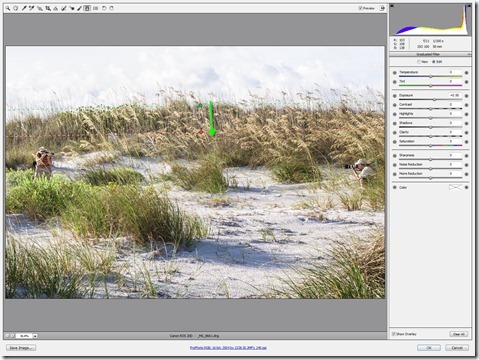
On a recent Saturday morning, I was privileged to join some fellow NAPP members for a friendly “Canon vs. Nikon” shootout, at Fort Desoto Park in Saint Petersburg, Florida. The original intent was to compare the new 5DMIII against the new D800. Out on the beach, things got a little crazy, and a few of us took the term “shootout” literally! I was on hand to capture some of the hilarity. [More]

Publish from Lightroom to Dropbox

29/05/2012

Cloud storage service Dropbox is a very handy and useful tool, allowing you to share files between your machines. For photographers, it provides and easy way to get your images on all your devices quickly and easily. If you’re using Lightroom, then the Publish Services that were introduced with LR3 give you direct integration from Lightroom all the way through the cloud – a very nice capability. In today’s video tip, you’ll learn how to set up a Publish Service to manage your Lightroom portfolios right within Dropbox. [More]

Photoshop CS6 Vector Fun

22/05/2012

With the new Photoshop CS6, we finally have vectors that have fill and stroke properties, and this gives us much more power and flexibility with our designs. In this video you’ll see the basics of creating a new vector object, modifying the fill and stroke properties, adding pixel-based effects to your vector object, and blending the object with your background. [More]

3D Text Video Animations in Photoshop CS6

08/05/2012

This will be a two part tip, and in today's video we will focus just on creating the reflective text, using image-based lighting. Stay tuned for next week's follow up, in which we'll learn how to animate the text and add even more lighting effects, all with the new power of video editing in Photoshop CS6. [More]

Creating Dashed and Dotted Lines in Photoshop

24/04/2012

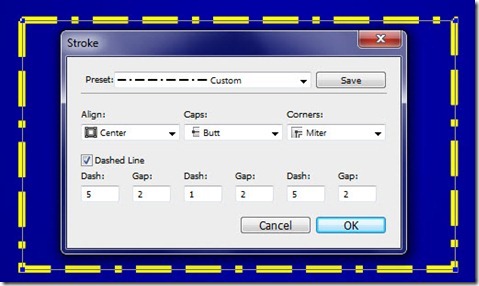
The more I play around with Photoshop CS6, the more I like all the great new capabilities that have been added to this amazing program. Did you know, that in Photoshop CS6, shape layers are a thing of the past, replaced in their entirety by vector layers? This is a tremendously powerful feature, which we will explore in detail over many tutorials in the future. For today, we’ll focus on a small new feature, but one which solves a big problem that has existed forever in Photoshop – how to create a dashed or dotted line. [More]

Type Tips for Photoshop CS6

17/04/2012

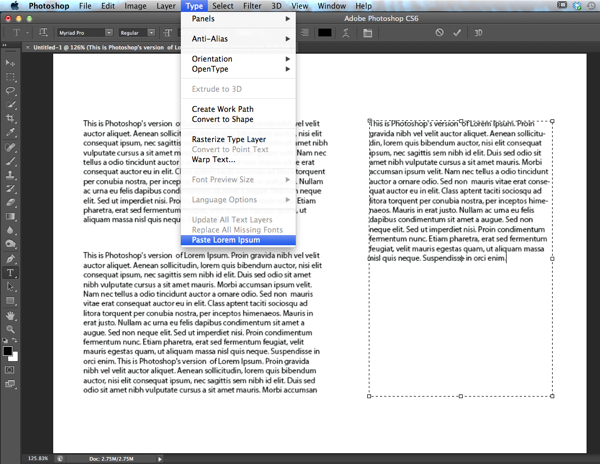
Photoshop CS6 comes with a few type tricks up its sleeve, and if you find yourself working with type a lot in Photoshop, especially if you are mocking up print layouts or web pages, you're going to get a lot of mileage with these new features. Let's take a look. [More]

Photoshop’s Enhanced Filters in CS6 Beta

03/04/2012

With Photoshop CS6, Adobe really integrated GPU acceleration into many of the filters, adding some great new ones along the way. The GPU, or Graphics Processing Unit, is a powerhouse that lives on our graphics cards and allows Photoshop to perform amazing feats of pixel manipulation. [More]
1 4 5 6 7 8 14
3-9