Did you see...

perfectreplica.io High Quality Best submariner replica Watches Online For Sale All of our Rolex watches are carefully selected.

Tutorial

Publish from Lightroom to Dropbox

29/05/2012

Cloud storage service Dropbox is a very handy and useful tool, allowing you to share files between your machines. For photographers, it provides and easy way to get your images on all your devices quickly and easily. If you’re using Lightroom, then the Publish Services that were introduced with LR3 give you direct integration from Lightroom all the way through the cloud – a very nice capability. In today’s video tip, you’ll learn how to set up a Publish Service to manage your Lightroom portfolios right within Dropbox. [More]
32 Bit HDR in Photoshop

25/05/2012

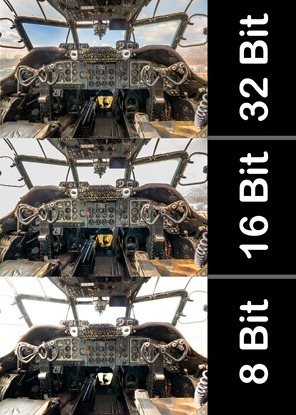
HDR, love it or hate it there’s no getting away from the fact that sometimes your camera can’t capture all the tones in a high contrast scene that you see. At that point you’ll need to take more than one image and blend the exposures together and create a more realistic (or surrealistic) image. [More]

The Navigator Panel in Photoshop

24/05/2012

While there are various tools, and plenty of methods for panning & zooming an image my favorite is still the Navigator Panel. If you're not in the habit of customizing your workspace or moving the panels around, you've probably never given the Navigator Panel much thought. At first glance it doesn't look all that impressive, but the trick is using it with a second monitor while sizing it really large. [More]

Dust Spot Removal in Lightroom

23/05/2012

The bane of a landscape photographer’s life is dust spots on the film or camera sensor.. The smaller the aperture, the greater the likely hood that ugly dust spots will appear in your images. [More]

Photoshop CS6 Vector Fun

22/05/2012

With the new Photoshop CS6, we finally have vectors that have fill and stroke properties, and this gives us much more power and flexibility with our designs. In this video you’ll see the basics of creating a new vector object, modifying the fill and stroke properties, adding pixel-based effects to your vector object, and blending the object with your background. [More]

Using Bokeh to Add Oomph To Image in Photoshop

21/05/2012

In this video, Eric takes the new Bokeh filter and uses it to 'beef up' his plain, flat image witha a “random but not random” approach. Although all the effects rely on bokeh the finished image shows no sign of bokeh at all. [More]

Double Process HDR with Photoshop

18/05/2012

In this video, Rich Harrington processes a three shot HDR and then double processes the image for extra “crunch”. This video tutorial follows Rich’s workflow from beginning to end. [More]

Create the Instagram Style in Lightroom

17/05/2012

It’s a pleasure to welcome a new Nut to TipSquirrel.com! Having been a fan of  Howard and IceFlowStudios  for some time I was thrilled when he agreed to  come and join our humble group of [More]

Coloring With Photoshop – Skin Pt. 2

16/05/2012

When last we saw our heroine she was looking a little, well, colorless. Today we’re going to perk things up a bit with a little help from history. First, we need to ask ourselves a couple of questions; what era is our image from and what era’s style do we want to borrow from? Of course, you can color your images any way you like, but personally, I like to borrow styles from the era the image was taken in. For the really old images that may mean striving for a watercolor or pastel look of a hand tinted image and portraits taken in the 40’s may call for the more saturated, glamorous style of that era. I’ll go more into the styles of each era and inspiration at a later date, but for now, since the image I’m working on was taken in the 40’s, you can go online and find an image or images from that era that appeals to you in terms of skin and hair color. You may feel like it’s wrong to borrow an image, but It’s okay to use these images for this purpose – all you’re going to do is sample color palettes, you’re not using the image or reproducing it in any other way. [More]

Photoshop Color Range Selections

11/05/2012

One of the best ways to make selections in Photoshop CS4, CS5 and CS6, is with the Color Range command. This is especially true for photos that have areas of contiguous color that are [More]

3D Text Video Animations in Photoshop CS6

08/05/2012

This will be a two part tip, and in today's video we will focus just on creating the reflective text, using image-based lighting. Stay tuned for next week's follow up, in which we'll learn how to animate the text and add even more lighting effects, all with the new power of video editing in Photoshop CS6. [More]

Basic Video Transitions with Photoshop CS6

07/05/2012

Up to now you’d have to pay a little extra and get Photoshop Extended to be able to edit video. Not any more! CS6 comes with an improved video toolkit and UI that makes editing fun and reasonably easy. Here Eric Renno (TipSquirrel) takes us by the hand and and leads us into the brave new world of video. [More]

An Easy Eye Enhancing Tip

03/05/2012

A quick and easy tip for a Thursday.  This tutorial is really an extension from a post I did a while back on High Pass Sharpening but in this tutorial we’ll be applying it to eyes and controlling [More]
1 30 31 32 33 34 62
3-9