Did you see...

perfectreplica.io High Quality Best submariner replica Watches Online For Sale All of our Rolex watches are carefully selected.

Tutorial

Photoshop’s Perspective Crop Tool

14/01/2014

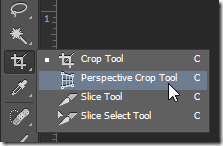
Sometimes it is the simplest tools that get the job done most quickly and efficiently. Photoshop's Perspective Crop Tool isn't the most glamorous tool in the toolbox, but it does its job well and with a minimum of fuss. Fix perspective distortion quickly and easily with this simple tool. [More]

Photoshop Slice Tool

09/01/2014

The slice tool can be used to help create webpages and elements of them. In this post I'll show you how to create a very simple navigation example. [More]

3D Particle Field in Photoshop CC

07/01/2014

Creating a particle field using Photoshop's 3D features requires a few tricks, but with a little setup and the right techniques, you can create some fantastic random effects. [More]

Making a Zig Zag Pattern in Photoshop

03/01/2014

Recently I was asked about making a Photoshop document with an editable zig zag pattern so I set off looking into using the pen tool and all manner of shenanigans, then I thought about using filter, here's what I came up with; [More]

Noise Reduction in Lightroom 5

31/12/2013

It’s inevitable when you’re making digital photographs that you are going to encounter digital noise. Noise in an image is the result of variability in the light level readings from one sensor pixel to the next. Even the best quality sensors will produce some level of noise, and the noise will be amplified under certain conditions. Fortunately, with Lightroom, we have built-in noise reduction capability, and the performance is exceptionally good. [More]

Facebook Cover Template Photoshop Document

29/12/2013

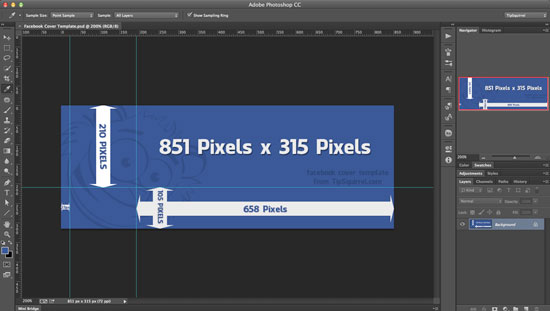
In a previous post I outlined Cropping For a Facebook Cover in Photoshop and since then I’ve been asked for the dimensions to fit around the profile picture. So, today I thought I’d make a template to make things much easier. There’s two files, a PSD that has the guides on the template and a jpg. [More]

Thank You and Happy Holidays

24/12/2013

It’s that time of year again, time for a little break. We’d like to thank you all for your support this year, its been a great twelve months. As you know, all the Nuts give their time, [More]

Photoshop Content Aware Scale

20/12/2013

Content Aware Scale allows you to reduce, or enlarge, your image without it causing the image to become elongated or squashed. In this video I look at three ways to use this incredibly powerful feature in Photoshop. [More]

Simulating Film Grain in Lightroom 5

17/12/2013

Add some character and grit to your black and white conversions with Lightroom's film grain simulator. This feature is great for bringing a little bit of nostalgia and that old time film look into your Lightroom black and white conversions. [More]

Lighting Effects in Photoshop CC

10/12/2013

The lighting effects filter in Photoshop has come a long way, and it borrows many concepts from the world of 3D. However, you don't need 3D to create some very dramatic lighting effects very quickly with this often overlooked filter. [More]

Text on a Circular Path with Photoshop Elements

02/12/2013

A little while ago I demonstrated how to put text on a circular path using Photoshop. I’ve been asked a few times since if the same result can be achieved in Photoshop Elements. The answer is bit yes and no, by its nature Photoshop Elements has some restrictions but in this video I demonstrate some workarounds to achieve something very similar. [More]

Quick Tip: Reduce Digital Noise with Photoshop

28/11/2013

Have you ever had an image that has bits of color in it that clearly shouldn’t be there? I suppose there are all sorts of reasons they may be there (High ISO, low light…), but all some people care about is that they’re there and they want them to go away! When you see a big splotch of red on a blue shirt, it seems the simple thing to do is to do a Hue / Saturation adjustment, use the dropper to select the red and change the hue and saturation until you have a better match, but the truth is if you do that, the selection won’t be red, it’ll be the same color as the color the splotch is on, or blue. So no go on that. Besides, getting the colors to match, even somewhat, would be a pain, especially if you had a lot of photos taken at the same time, in the same conditions. So, the bad news is you can’t make them just easily go away. You can reduce them, though, and do it pretty fast, too. [More]
1 14 15 16 17 18 62
3-9