Did you see...

perfectreplica.io High Quality Best submariner replica Watches Online For Sale All of our Rolex watches are carefully selected.

Tutorial

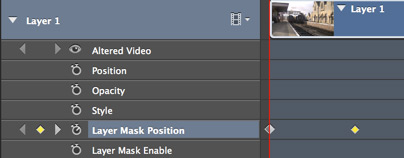
Intro to Keyframes in Photoshop : Animating Masks
14/03/2014

In this video I take a short video clip and, using masks and keyframes, make a simple introduction to the video. Keyframes are a major part of video editing and are used extensively through the whole Creative Cloud and Creative Suite. [More]

Using Lightroom on Two Computers

12/03/2014

My main Lightroom catalog is on a desktop Windows machine in my home studio, but I travel with a MacBook Pro, and use the laptop computer for working with Lightroom on the road. In this video, I'll discuss the way I merge photos from my remote shoots back into my main Lightroom catalog. In order to do this, I use Lightroom's "Export as Catalog" and "Import from another Catalog" features to transfer and merge my two separate catalogs into one. Keep in mind that this is one of a number of possible strategies, but it is the one that works for me. [More]

Pen Tool in Photoshop – Converting Points

04/03/2014

We continue to progress through the tricks and details of using the Pen Tool in Photoshop, and today we look at ways of converting anchor points from corners, to smooth curves, to cusp points and back. This final skill, combined with what we’ve learned in the previous videos, will give you everything you need to manage creating and editing of virtually any complex path in any image. [More]

Enhancing Hair – A Photoshop Workflow Example

01/03/2014

In this workflow example I take take a look at enhancing hair, and what better way than with this wonderful sloth? You'll see my workflow for this image from start to finish including Adobe Camera Raw and finishing touches in Photoshop. [More]

Pen Tool in Photoshop–Cusp Points

25/02/2014

In this, our 5th instalment of our series on using the Pen Tool in Photoshop, we explore the problem of cusp points. Cusps are formed when two curves meet, but not in a smooth point – rather in a corner or sharp angle, as you might see on a heart, or perhaps on the fin of a fish. The technique for drawing this type of shape in Photoshop is not obvious, but it is easy once you know how. [More]

Pen Tool in Photoshop – Smooth Curves

18/02/2014

We’ve been chipping away at the Pen Tool in Photoshop, and in this part 4 of our series, we finally begin to draw curved paths, freeform, with the Pen Tool. Learning to use control points and control handles requires some practice and some experience, but with the knowledge base from the first three segments in this series, we’re ready to tackle curved paths. [More]

Photoshop Smart Objects from Adobe Illustrator

14/02/2014

Wanting to at a scribbled text effect to an image I looked to Adobe Illustrator. The great thing about Creative Suite and the Creative Cloud is that the applications work so seamlessly together. Here I create the text in illustrator and then bring it to Photoshop as a smart object, making it editable at any time. [More]

30 Second Photoshop Series

07/02/2014

I recently started a new series on YouTube and I'd love to know what you think. Each video's 30 seconds long and has a quick Photoshop tip. They won't be appearing at TipSquirrel all the time so make sure you subscribe to the channel to be notified about new videos. [More]

Pen Tool in Photoshop–Straight Paths

03/02/2014

In part 2 of my series on using the Pen Tool within Photoshop, we finally do break out the Pen Tool, and start drawing straight line paths. Learn how to place and modify corner anchor points, and how to close a path. With the closed path, we'll learn how to save the path, load the path as a selection and use it as a layer mask. [More]

Pen Tool in Photoshop – Path Fundamentals

28/01/2014

In this series of videos, we are going to work our way from the basics to pen tool mastery, but we need to start with the fundamentals. In fact, in this video, I’m not even going to use the pen tool. Instead, we’ll spend our time understanding how paths work in Photoshop, so that when we do start using the pen tool, we’ll be on familiar ground. [More]

Linked Smart Objects

27/01/2014

In a recent update to Photoshop CC adobe introduced Linked Smart Objects. They work the same as Smart objects but with a unique, ad helpful difference, they link back to the source, let's look at an example; [More]

Skin tone correction using RGB Curves in Lightroom 5

23/01/2014

When it comes to editing skin tones, Adobe Photoshop has always reigned supreme. Lightroom could change the white balance and even alter the Hue, Saturation and Luminance values, but this is often not accurate enough to render great skin tones. This changed with the introduction of RGB curves in Lightroom 4, allowing us to change the values of Red, Green & Blue at a specific tonal range of the image. How this changes things will be explained below, but suffice to say it makes for much nicer skin tones without the need to export to photoshop. [More]

The new Perspective Warp in Photoshop CC

21/01/2014

Adobe Photoshop CC now has a new Perspective Warp feature, just introduced, that will allow you to adjust the perspective of image elements in an automated and controlled way. This will help you to create more realistic composites from images that may not match in their original perspective. [More]

Photoshop CC New Workflow Features January 2014

17/01/2014

In the latest update to Photoshop CC we saw a couple of great new features added. These 'sexy' new features are great for making headlines, but what about those more subtle upgrades that make our workflow that little bit easier. Here's my pick of the bunch; [More]
1 13 14 15 16 17 62
3-9