Did you see...

perfectreplica.io High Quality Best submariner replica Watches Online For Sale All of our Rolex watches are carefully selected.

Tutorial

Make the Most of Text with the Photoshop Character Panel

01/05/2014

Photoshop has a great capability for manipulating text and there's a real powerhouse in the Character Panel. In this video for Fotolia I take a look at all the features in the panel to make a simple poster layout. I look at kerning, glyphs and font sizing among other great features. [More]

How to post to Facebook with Lightroom

29/04/2014

Did you know you can post to Facebook from Lightroom, directly and automatically? Back in version 3, Adobe introduced Publish Services to Lightroom, and this continues to be the best way to manage your photos when you’re posting to social media. [More]

Lightroom Workflow : Good to Great

22/04/2014

I get questions all the time about my workflow, and in this tutorial I’m answering some specific questions I got related to some recent bird photos I posted on my Flickr photostream. Some other photographers had been with me and struggled to capture images in the same location and time. In addition to the workflow I present in this video, I’ll add some additional tips [More]

Lightroom 5 – Keyboard Shortcuts

15/04/2014

Everybody loves keyboard shortcuts, and today on TipSquirrel, we have Lightroom 5 Keyboard Shortcuts for you! Learning keyboard shortcuts can help boost your productivity and can be the key to a smooth and consistent workflow. In addition, you’re taking some of the work away from your mouse, and that can be a benefit if you tend to suffer from repetitive motion stress. There are a few Lightroom 5 keyboard shortcuts everyone should know – for example, the big three in my mind are “G, E, D” (for grid view, loupe view, and develop module view). And there’s “R” for the crop tool. But there are oh, so many more Lightroom 5 keyboard shortcuts. [More]

Lightroom Mobile Quick Setup Guide

08/04/2014

As you may have noticed, Adobe has just released Lightroom 5.4, along with the new Lightroom Mobile for iPad. Lightroom mobile extends your workflow beyond the desktop, and onto your iPad, where you can review, rate and even edit your images, and have the changes synchronized automatically back to your main catalog. Lightroom uses the Creative Cloud storage services as the hub for this synchronization, and as a result, you must be a member of one of the subscription services for this to work, including any of the Creative Cloud plans, or the Photoshop Photography Program. The iPad app is completely free, so this is just another benefit of the Creative Cloud subscription. [More]

Photoshop Rounded Rectangles and Bender From Futurama

06/04/2014

I recently created this Bender from Futurama as an exercise for a live class and posted the result on line. There was some interest so I thought I'd share it with all my TipSquirrel friends. As mentioned in the video, the file is available, with all the finished layers and guides. You'll find it beneath the video in the 'Media locker'. All this is is a way to share the post and keep the content free to all. [More]

Abstract Photoshop Technique

03/04/2014

There are endless ways to create abstract images, but here’s one that’s just fun. This abstract Photoshop technique has you interacting with the image, pushing pixels around, and it can be as much fun as finger painting, but without all the mess. The way this works is to start with an image that has vibrant colors and a bit of contrast and texture, then warp and manipulate layers, blending the results together using the Photoshop layer blend modes. You’ll never know where you’ll end up when you start, but the exploration is half the fun. This abstract Photoshop technique is flexible and extensible, and you can add on to your heart’s content. In this video, I even go so far as to take a copy of the image and wrap it onto a 3D sphere to add some additional geometric surrealism. [More]

Photoshop Character Palette – Fotolia Beginner Guide Series

28/03/2014

I thought I’d take the opportunity this week to tell you about a series I’ve been producing for our friends at Fotolia. This brilliant stock images site has been a supporter of TipSquirrel.com for some time and I’m delighted to be making these Photoshop for Beginners tutorials for them. In the latest tutorial I take a look at the Character Palette and discover how you can manipulate live text. [More]

A Portable Lightroom Catalog

25/03/2014

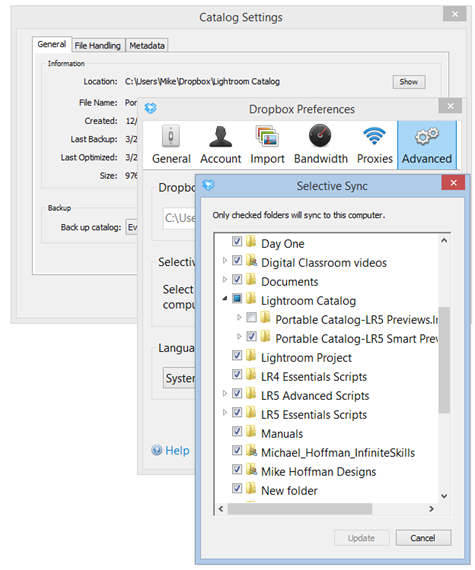
Lightroom 5 brings with it a great new feature in Smart Previews. Combine the capabilities of Smart Previews (the ability to develop and export your images based on the relatively small file size of the Smart Preview) together with the convenience and decreasing cost of cloud storage systems (such as DropBox or Google Drive) and you have some interesting ways of creating a portable, no-hassle catalog solution. [More]

Animate Photoshop Layer Styles to Make a Channel Bug

21/03/2014

A channel bug sits in a corner of the screen and acts as a little 'watermark' or ident for your video. They're really easy to make and just as easy to animate using Photoshop CC or Photoshop Extended. In this video I show you how! [More]

Pen Tool in Photoshop–Putting it all Together

18/03/2014

In this video, we step through the process of extracting an object from a busy background – one that doesn’t work well at all with the quick selection too, nor any of the pixel based selection tools. The Pen Tool is the right tool for this job, and we’ll step through the practical use of the Pen Tool for this [More]
1 12 13 14 15 16 62
3-9