Did you see...

perfectreplica.io High Quality Best submariner replica Watches Online For Sale All of our Rolex watches are carefully selected.

Tutorial

Lightroom and Photoshop – Smart Editing

08/07/2014

When you make adjustments to your raw files in Lightroom, you have the flexibility and the power of non-destructive edits – and unlimited undo steps. But, when you edit in Photoshop, the changes are written into the pixels and the result is a raster layer, ready for editing. However, Lightroom and Photoshop have another editing path available – one that preserves the raw data during the handoff, and maintains the non-destructive flexibility. Lightroom and Photoshop are made to work together, and there is more than one way to move files between them. In this video, we will examine the workflow in which a raw file in Lightroom is sent over to Photoshop as a Smart Object. [More]

Lightroom and Photoshop – Round Trip Editing

01/07/2014

If you're new to Lightroom, the process of sending images to Photoshop for editing can be confusing. In this video, I review some of the ways of sharing files back and forth between Lightroom and Photoshop, pointing out some key considerations and some traps you'll want to avoid. [More]

Installing Photoshop Kuler Panel and Why You Need It

26/06/2014

Some readers might remember that I wrote about bringing Kuler color themes into Photoshop some time ago, it was a real frustration that to me, and I dare say many others, that you couldn't connect to you own Kuler themes directly from Photoshop. Well, I'm pleased to say those days are over! [More]

Photoshop 2014 – New Features and My Favourites

18/06/2014

Today saw Adobe make an upgrade to it's Creative Cloud and with it some great new updates to Photoshop. In this video I take a look just a few of my favourites. There's loads more, there's a comprehensive list below the video. [More]

Lightroom and Photoshop – Open as Layers

10/06/2014

Now that Photoshop and Lightroom are available as part of the popular Photoshop Photography program from Adobe, many people are starting to use Lightroom and Photoshop together for the first time. Naturally, that leads to some confusion when it comes to workflow. [More]

Make Lightroom Default Develop Settings ISO Specific

04/06/2014

You can set Lightroom Default Develop Settings so that certain parameters are automatically applied every time you import an image. But some parameters, like Noise Reduction, require different settings based on the specific ISO setting of that camera. [More]

Easy Folded Banner Vector Shape in Photoshop

31/05/2014

The folded banner is a popular feature at the moment so it was no surprise that I was asked if i could come up with an easy way to create one. The result is not only easy but is created entirely with vectors which means its scalable while remaining completely editable. Don't panic if you're not used to using vectors, there's nothing that a beginner won't be able to handle here, yes I use the Pen tool but to make just a single click. [More]

Adobe Camera Raw Basic Panel and Lightroom Develop Module

29/05/2014

When you open an image into Photoshop or Photoshop Elements you're automatically taken into Adobe Camera Raw. This is a hugely powerful application that you may find does all you need for an image. In this video I take a look at the Basic Panel, this is the same as the Develop Module on Lightroom and is similar to that found in Photoshop Elements. [More]

Wrap a 2D Image onto a 3D Cylinder in Photoshop

27/05/2014

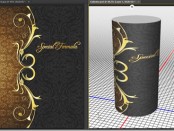
Today we answer a viewer question from the TipSquirrel mailbag: How do I wrap a 2D image onto a 3D cylinder in Photoshop? For an existing file or JPG image, the solution isn’t difficult, but as with all things Photoshop, there are a number of ways to accomplish this task. [More]

Lightroom Adjustment Brush Presets

20/05/2014

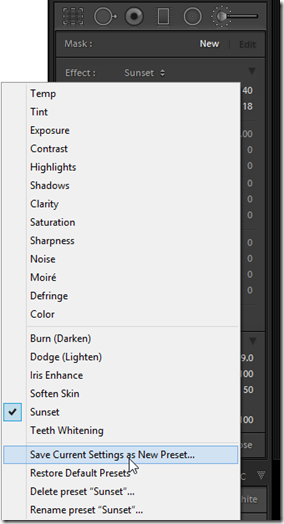
The introduction of the Local Adjustment Brush back in Lightroom 2 was the first step in transforming Lightroom from a global editor to a fully parametric, flexible content enhancement editor. The adjustment brush capabilities have improved with every release of Lightroom since then, but you may not have been aware of the existence of Adjustment Brush Presets. [More]

Photoshop Retouching Tips – Nondestructive Healing

13/05/2014

The cloning and healing tools in Photoshop continue to improve all the time, and now most of the retouching tools offer Adobe’s amazing “content-aware” technology. However, in order to get the most from the Healing Brush, Patch Tool, Clone Stamp, and all the others, you’ll want to explore ways to accomplish nondestructive healing during your retouching sessions. [More]

Photoshop Crop Tool – Its Not Just For Cropping

08/05/2014

CoverPhotoshop Crop Tool has, you may thing one simple basic function, but it has a whole host of other great features beside just resizing your image. It'll straighten, add canvas and even has different overlays to help with composition. [More]
1 11 12 13 14 15 62
3-9