Did you see...

perfectreplica.io High Quality Best submariner replica Watches Online For Sale All of our Rolex watches are carefully selected.

Tutorial

Photoshop 3D Depth Maps

26/11/2013

Creating a depth map within Photoshop's 3D engine is easy, and it's a great way to allow you to sculpt irregular surfaces. Using black and white similar to dodging and burning, you can lift and push the surface of your 3D object to give it added depth and realism. [More]

Photoshop Shake Reduction Filter

25/11/2013

In this video I take a quick look at a Photoshop Shake Reduction Filter. When I first saw this demonstrated I thought we were years away from seeing this as part of the public release, yet here it is. Some images fair better than others but I’ve it a try before you discard an image, you never know! [More]

Quick Tip: Perfect Black & White

22/11/2013

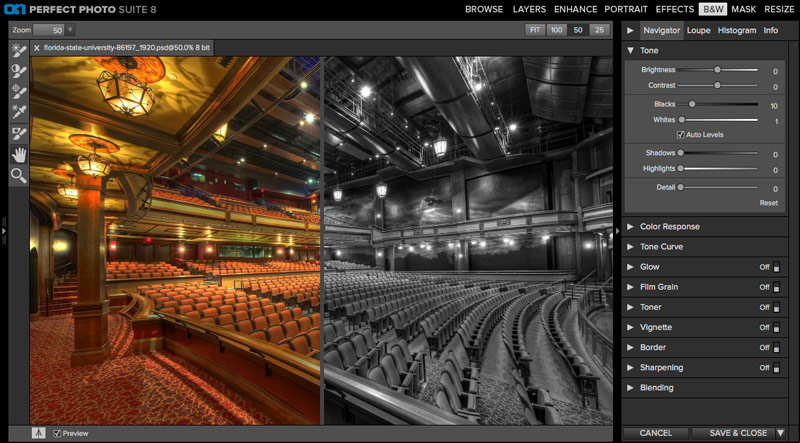
The first thing you'll notice if you've used the perfect suite before is that the user interface is brand new and very slick. The whole cast of characters now use the same UI, which has a similar look and feel to Lightroom, and is more responsive compared to some older versions of these plugins. (Some of the previews can still take a second to catch up to your mouse, but all in all much better in this version.) [More]

Photoshop Symmetry with the Clone Source Panel

19/11/2013

When you use the Clone Source Panel in conjunction with the Clone Stamp Tool in Photoshop, you can make your image literally stand on its head. Use the Clone Source Panel to display, distort, mirror and stretch your clone source to create a more dynamic effect. [More]

Color Correct Mixed Light Sources in Photoshop

12/11/2013

Wouldn't it be great (for image artists) if you could arrange to have all your light sources share the same temperature? Unfortunately, that doesn't happen in real life, and between flash, tungsten lights, fluorescent lights, and sunlight, you may find yourself with a mixed lighting bag. No single white balance setting will correct the entire image, so you have to resort to local corrections. In this video, I'll show you a technique in Photoshop for selecting the contaminated color areas easily, then a way to match the color of these areas to the rest of the image using some layer blending mode tricks. [More]

Oil Paint Filter Workflow for More Natural Looking Images

11/11/2013

Over the past couple of months I've been exploring the Oil Paint filter in Photoshop. One of the things I wasn't happy about was the swirly, un-natural effect it was encouraging. So, I've come up with a workflow to help create more natural looking images, with a more natural paint feel to them. This technique is very easy and as you can see, even with explanation this one only takes 12 minutes to achieve. [More]

Embed Your Copyright with Photoshop

08/11/2013

In this tutorial we’ll have a look at metadata and how to control what information you share when uploading your photos to the net or sharing then with clients. Metadata is information that’s collected at various points along the process of image creation. It’s invisibly added to your photos by your camera, computer and by you if you so choose. The type of information it contains varies but can include what brand of camera you used, the lens zoom length, camera mode used, exposure information and even serial numbers of your gear. Post processing in Photoshop adds more information such as which version of Photoshop you used and when it was edited. [More]

Getting Freaky with Photoshop Patch Tool

07/11/2013

I will show you how to remove your eyes, nose and mouth easily from a photo just using the patch and healing tools. When creating horror pictures its often useful to remove whole parts of a face, and start again, as such I found using this method where we can remove any part of a face very easily. [More]

Customizing the Lightroom Interface

05/11/2013

Lightroom is very efficient at importing, organizing, sorting and developing, but it makes a great tool for showing your work as well. The interface, while flexible and useful, can be customized to some degree so that you can present a professional, more polished image to your clients. With Lightroom's customization features, you can simplify the visible part of the interface, and this can even help you streamline your workflow as well. Today, we're going to look at customizing the side panels. [More]

Tonal Recovery in ACR

30/10/2013

Can photo restoration be done in Adobe Camera Raw (ACR)? Of course, you know it is. After all, you’ve seen it before, right? Up to a point, that is. You’re not going to be able to remove specks, spots, cracks and tears in ACR, so to be more precise, what you can do is add clarity. That’s it in a nutshell; restoration in ACR is all about clarity. So I suppose you could say that, no, photo restoration cannot be done in ACR, but tonal recovery most certainly can! [More]

Customize your Lightroom 5 Splash Screen

29/10/2013

A new and little-known feature in Lightroom 5 is that we now have the ability to customize the splash screen – the initial graphics that show up when the program starts. The default splash screen for Lightroom 5 is one that you’ve grown accustomed to, and it follows the Creative Cloud design style: [More]

Soft Border with Photoshop Selection Techniques

28/10/2013

This technique is one of those ones that acts as a starting point. Creating the soft border really is very simple when you know how, but how you use it has endless possibilities. From Blending Modes to colour, everything will have an impact on how your image is presented. [More]

Improve Quick Selections with Photoshop Refine Edge

25/10/2013

Today we'll examine how the Refine Edge command (also available as the "Mask Edge" command when working with layer masks in the Properties panel) can further improve our selections. While Quick Selection is fast and useful for selecting items that contrast strongly with surrounding elements in the frame, sometimes your subject may blend in with other elements. [More]

Photoshop Keyboard Shortcuts Cheat Sheet

23/10/2013

Shortcut key combinations can speed up a workflow and keep creativity flowing uninterrupted. So regular users will make a point of learning a few, then discovering more as they progress.There’s lots of cheat sheets out there but what if you’ve changed the shortcut to something you find easier to remember? Well, Photoshop has a built in cheat sheet maker, it’s nothing fancy, but it can be quite handy. [More]
1 15 16 17 18 19 62
3-9