Did you see...

perfectreplica.io High Quality Best submariner replica Watches Online For Sale All of our Rolex watches are carefully selected.

Photoshop

Your Phone Camera Photos Suck (Blur Removal Software Review)

13/02/2013

No matter how good the settings on your phones camera are, they probably aren’t going to help out of focus or blurry images. You might try to take multiple shots of whatever you’re photographing, and hope at least one comes out halfway decent – that’s usually my main M.O., but if you are stuck with blurry or out of focus images, what can you do? [More]

A Kinder, Gentler HDR in Photoshop CS6

12/02/2013

HDR doesn't have to be gritty, edgy, with radioactive colors. At its heart, HDR is a technique that can allow you to more accurately capture the images you see - as long as you aren't too heavy-handed with the controls. [More]

Creating a Chiseled Text Effect in Photoshop and Photoshop Elements

11/02/2013

We'll be using Photoshop layer styles to achieve the effect as well as the somewhat obscure Type Mask tool. If you're not familiar with this tool, it's a little like a cross between the Type tool and Quick Mask; we can type our text as usual but when it's committed, instead of creating a layer with the text it creates a selection; this is perfect for the technique as we do not need to work on the text directly. You can follow the original tutorial using the link above but change the dimensions to 1000x200 pixels to create the correct document size. If you don't want to start the image from scratch, it can be downloaded here. [More]

Layer Comps in Photoshop

05/02/2013

The Layer Comps feature in Photoshop allows you to create and save a variety of different compositions within a single file, and switch back and forth between the layouts quickly and easily. You can even save all your comps automatically to a group of files. [More]

Conditional Actions in Photoshop

30/01/2013

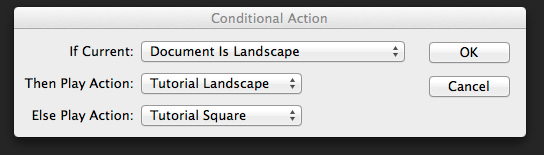
The latest update to Photoshop (only available to Creative Cloud users, don’t blame me talk to Adobe, but I probably agree with you) included something called Conditional Actions. Conditional Actions are a way of adding a clause to an action that will cause another action to run if the clause is applicable or another to run if it isn’t. Clear? No, probably not, so I’ll create a real world example to explain more clearly (hopefully). [More]

Image Variations with Photoshop Gradient Maps

29/01/2013

If you look in Photoshop’s Adjustments Panel, right at the very bottom, in the last position, is the really technical sounding “Gradient Map.” If you haven’t seen this adjustment in action, or known what it can do, you’d be entirely likely to pass right over it – it sounds complicated. But, it isn’t. Gradient Maps are one of the simplest ways of toning or tinting an image. In fact, if you like to tinker with your image, searching for a certain “look,” the Gradient Map can provide a seemingly endless train of color variations, all with a few clicks. Let’s see how it works. [More]

Symmetry with Photoshop

18/01/2013

As a photographer symmetry is one of the hardest types of composition you can find. Nature has a habit of avoiding symmetry most of the time. You’ll never walk through a forest and find two identical trees and you’ll never see the left side of the sky perfectly matching the right. However it is dead easy to create symmetrical images using Photoshop, the knack is disguising the fact that you used Photoshop at all. In this video I’ll show you how to mirror an image and then apply a few tweaks to complete the perfect symmetric photo. [More]

Creating a Marble Texture Effect in Photoshop and Photoshop Elements

17/01/2013

In this tutorial we're going to conjure a marble-style texture in Photoshop and Photoshop Elements. This can be used for anything from 3D textures to creating a fancy background for a web banner; as we have done here. The effect hinges around the Clouds filter; yes, the highly versatile filter that's great for creating anything other than clouds. By combining this with further filters, adjustments and layer blend modes, we can achieve a fairly realistic texture quickly and easily. Let's get started. [More]

Photoshop Photo Restoration Assistance, Adam

16/01/2013

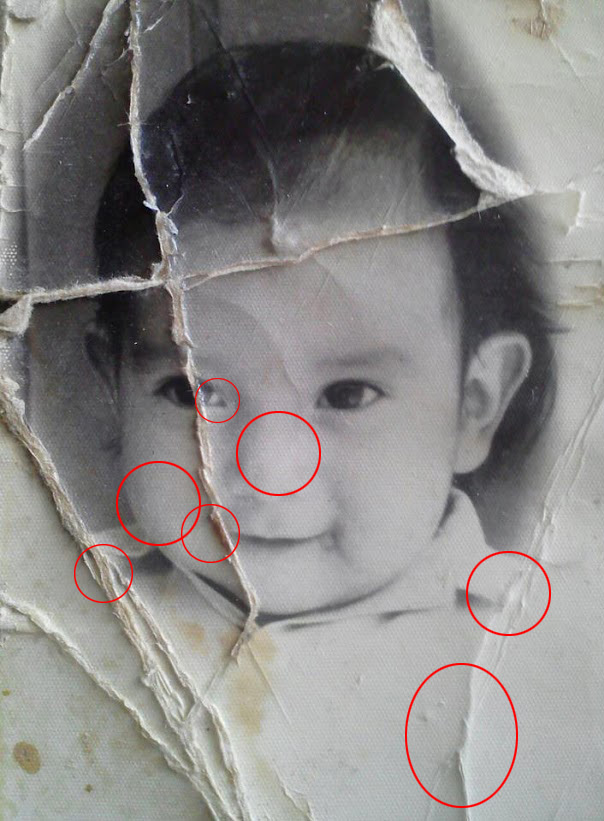
There was a post on the G+ Photoshop and Lightroom Users group last week, from member Adam Holloway, along with this before and after photo restoration: He wrote that this was his “first real [More]

Photoshop CS6 Adjustment Brush Tricks

15/01/2013

The Camera Raw Adjustment Brush controls get better with each version, and with Photoshop CS6 you have more control and flexibility than ever before. Don't be afraid to experiment with different settings, and to combine multiple adjustments in a single brush. [More]

Saving and Optimizing Images in Photoshop

08/01/2013

You just spent a good amount of time finessing your most recent image to a state of graphics bliss, and now it’s time to save that file in one or more versions for web use (email, Facebook, web [More]
1 14 15 16 17 18 45
3-9