Eric’s background in video editing with Adobe Premier led to his interest, and then obsession, with Photoshop. Starting TipSquirrel.com as a hobby he is proud to have gathered together and be a part of The Photoshop Nuts.
Known as only “TipSquirrel” for two years, Eric ‘went public’ when he was a finalist in The Next Adobe Photoshop Evangelist competition. He’s also been a finalist in Deke’s Techniques Photoshop Challenge.
While still taking on some freelance work, Eric has recently become a Lecturer at Peterborough’s Media and Journalism Centre where he enjoys sharing his knowledge as well as learning new skills. This realisation that he loves to teach has made Eric look at altering his career path.
I was recently asked about becoming an Adobe Certified Expert and what I think is the best study tools, so I thought I’d make it the subject of my post this week.
I’m not going to lie to you, taking the exam was a nerve-racking experience. I’ve taken it a few times now and I can’t say it gets any easier, but I like doing it, and I certainly like getting the results (so far). [More]
I recently created this Bender from Futurama as an exercise for a live class and posted the result on line. There was some interest so I thought I'd share it with all my TipSquirrel friends.
As mentioned in the video, the file is available, with all the finished layers and guides. You'll find it beneath the video in the 'Media locker'. All this is is a way to share the post and keep the content free to all. [More]
I thought I’d take the opportunity this week to tell you about a series I’ve been producing for our friends at Fotolia. This brilliant stock images site has been a supporter of TipSquirrel.com for some time and I’m delighted to be making these Photoshop for Beginners tutorials for them.
In the latest tutorial I take a look at the Character Palette and discover how you can manipulate live text. [More]
A channel bug sits in a corner of the screen and acts as a little 'watermark' or ident for your video. They're really easy to make and just as easy to animate using Photoshop CC or Photoshop Extended. In this video I show you how! [More]
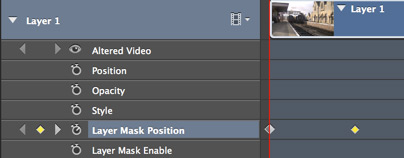
In this video I take a short video clip and, using masks and keyframes, make a simple introduction to the video.
Keyframes are a major part of video editing and are used extensively through the whole Creative Cloud and Creative Suite. [More]
In this video I take a standard portrait and quickly add an effect using Filter Gallery and a mask.
I fully appreciate its not going to be something you use regularly on your portrait photos, but its worth adding the masking technique used here to your Photoshop toolbox. [More]
This full day workshop will encourage and support attendees to experiment with studio lighting of all kinds. There'll be both flash and continuous lighting available to light the two models. Once you've captured your images you can take them to a spacious classroom adjacent to the studio where you can use Adobe Photoshop to edit them.
Two trainers will be on hand, Eric Renno an Adobe Certified Expert in Photoshop and Sian DeCiantis, a Media Lecturer. [More]
In this video I take a departure from Photoshop and take a look at Screenflow. This screen recording software is more than meets the eye, it has all manner of bells and whistles, which is why it's become my recording, and editing choice for tutorials. [More]
Wanting to at a scribbled text effect to an image I looked to Adobe Illustrator. The great thing about Creative Suite and the Creative Cloud is that the applications work so seamlessly together.
Here I create the text in illustrator and then bring it to Photoshop as a smart object, making it editable at any time. [More]
I recently started a new series on YouTube and I'd love to know what you think. Each video's 30 seconds long and has a quick Photoshop tip. They won't be appearing at TipSquirrel all the time so make sure you subscribe to the channel to be notified about new videos. [More]
January 2014 saw a major update to Photoshop CC, one of the hidden away updates was the Picture Frame. To my mind, it's better suited to Photoshop Elements, for those scrapbookers among us. There's some good, bad, and damn right ugly. [More]