Did you see...

perfectreplica.io High Quality Best submariner replica Watches Online For Sale All of our Rolex watches are carefully selected.

Conditional Actions in Photoshop
30/01/2013

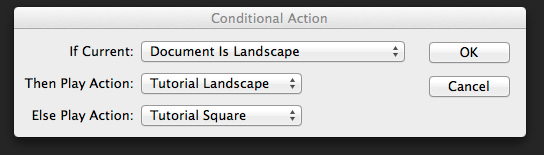
The latest update to Photoshop (only available to Creative Cloud users, don’t blame me talk to Adobe, but I probably agree with you) included something called Conditional Actions. Conditional Actions are a way of adding a clause to an action that will cause another action to run if the clause is applicable or another to run if it isn’t. Clear? No, probably not, so I’ll create a real world example to explain more clearly (hopefully). [More]

Image Variations with Photoshop Gradient Maps

29/01/2013

If you look in Photoshop’s Adjustments Panel, right at the very bottom, in the last position, is the really technical sounding “Gradient Map.” If you haven’t seen this adjustment in action, or known what it can do, you’d be entirely likely to pass right over it – it sounds complicated. But, it isn’t. Gradient Maps are one of the simplest ways of toning or tinting an image. In fact, if you like to tinker with your image, searching for a certain “look,” the Gradient Map can provide a seemingly endless train of color variations, all with a few clicks. Let’s see how it works. [More]

Photoshop’s Forgotten Clone Source Panel

25/01/2013

If you're not taking advantage of this useful panel, it doesn't surprise me. I consistently come across folks who use the Clone Stamp, Healing Brush, etc., in their daily workflow, but have never heard of the Clone Source panel. Let's discuss what you're missing: [More]

Lightroom 4 Adjustment Brush Tricks

22/01/2013

Lightroom 4 brings all the same capabilities you'll find in Camera Raw for the Adjustment Brush, as well as the Graduated Filter. Add multiple effects, control your image non-destructively. Plus, Lightroom adds some nifty controls all its own to make your editing more efficient. [More]

Using Photoshop Shapes to Make Apple Maps Type Pins

21/01/2013

In this video I’ll use Photoshop shape capabilities to make Apple Maps typpe of pin to add to my image. I’ll use stroke, gradient, stroke positioning and many other settings as well as some handy tips on manipulating paths. As always I’d love to see your images using this technique! [More]

Symmetry with Photoshop

18/01/2013

As a photographer symmetry is one of the hardest types of composition you can find. Nature has a habit of avoiding symmetry most of the time. You’ll never walk through a forest and find two identical trees and you’ll never see the left side of the sky perfectly matching the right. However it is dead easy to create symmetrical images using Photoshop, the knack is disguising the fact that you used Photoshop at all. In this video I’ll show you how to mirror an image and then apply a few tweaks to complete the perfect symmetric photo. [More]

Creating a Marble Texture Effect in Photoshop and Photoshop Elements

17/01/2013

In this tutorial we're going to conjure a marble-style texture in Photoshop and Photoshop Elements. This can be used for anything from 3D textures to creating a fancy background for a web banner; as we have done here. The effect hinges around the Clouds filter; yes, the highly versatile filter that's great for creating anything other than clouds. By combining this with further filters, adjustments and layer blend modes, we can achieve a fairly realistic texture quickly and easily. Let's get started. [More]

Photoshop Photo Restoration Assistance, Adam

16/01/2013

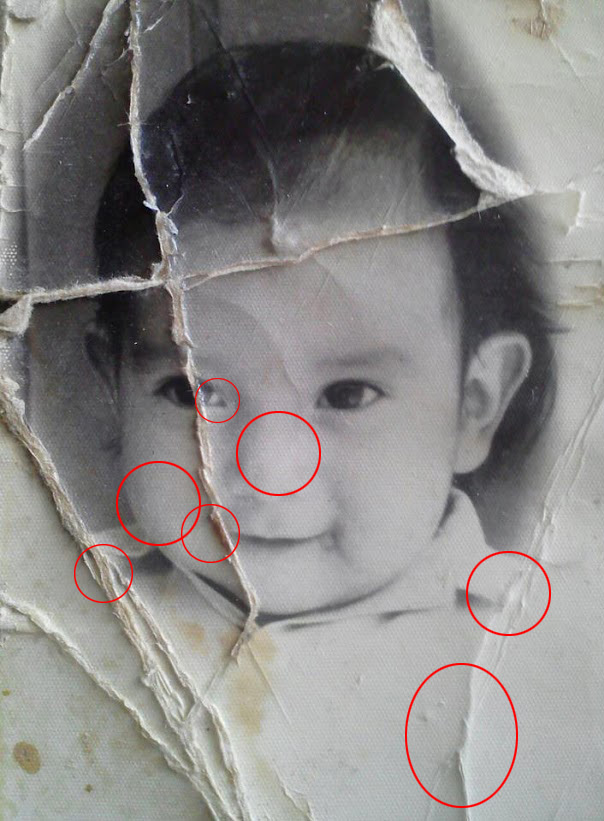
There was a post on the G+ Photoshop and Lightroom Users group last week, from member Adam Holloway, along with this before and after photo restoration: He wrote that this was his “first real [More]

Photoshop CS6 Adjustment Brush Tricks

15/01/2013

The Camera Raw Adjustment Brush controls get better with each version, and with Photoshop CS6 you have more control and flexibility than ever before. Don't be afraid to experiment with different settings, and to combine multiple adjustments in a single brush. [More]

Photoshop Clipping Masks

14/01/2013

In this video I take a look at Clipping masks. They are really easy to create and have a whole host of applications. This video was made in response to a question in the Google Plus Community; Photoshop and Lightroom Users where I’m one of the moderators. i think it goes without saying, I’d love to see and chat to you there! [More]

Saving and Optimizing Images in Photoshop

08/01/2013

You just spent a good amount of time finessing your most recent image to a state of graphics bliss, and now it’s time to save that file in one or more versions for web use (email, Facebook, web [More]
1 29 30 31 32 33 80
3-9