Did you see...

perfectreplica.io High Quality Best submariner replica Watches Online For Sale All of our Rolex watches are carefully selected.

Tutorial

Create An Alphabet Soup Text Effect In Photoshop

20/05/2013

In this video I create an Alphabetti Spaghetti, or Alphabet Soup tpy text effect using just one Filter and a few instances of Bevel and Emboss. The Action created in this tutorial can be downloaded by sharing this post via the buttons below the video [More]

Visualize Spots in Lightroom 5

17/05/2013

Lightroom 5 comes with some pretty nice upgrades, but one of the smaller additions may make many photographers excited. Many times you'll find yourself with a nice looking photo, but because of certain conditions, your lens or surroundings may contain a bit of dust. [More]

Moving Backgrounds to Fix Backgrounds in Photoshop

15/05/2013

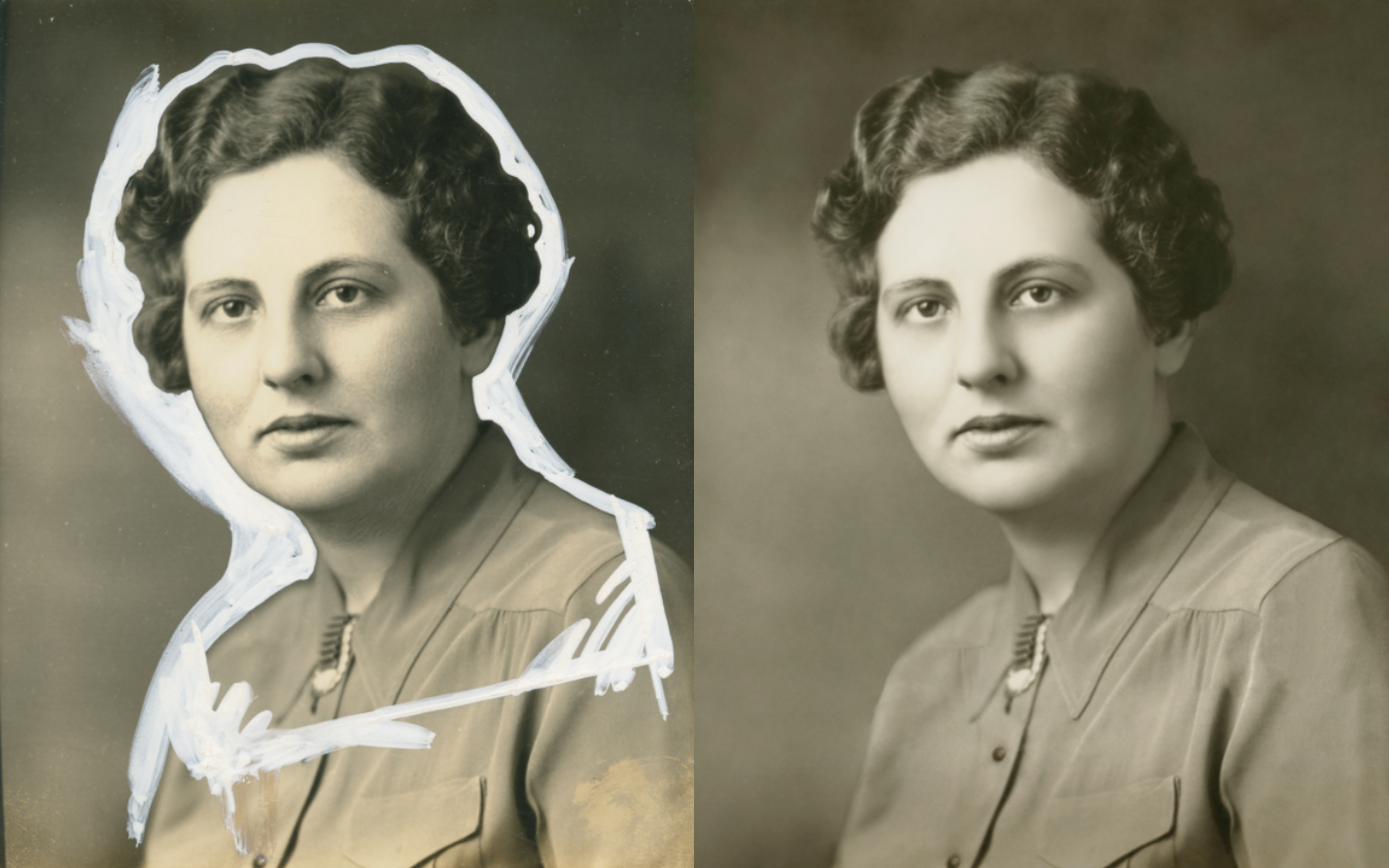
What you see, below, is an aberration, a crime committed against a helpless photograph. Yes, a real photograph was harmed in the making of this mess. Why it was done is beside the point; it was done many years ago and now this image remains as one of the few a daughter has of her mother. This may not be a situation that comes up for the majority of you, but in case it, or something like it comes up, there’s a fairly easy way to get the white out…out. [More]

Lighting 3D in Photoshop CS6

14/05/2013

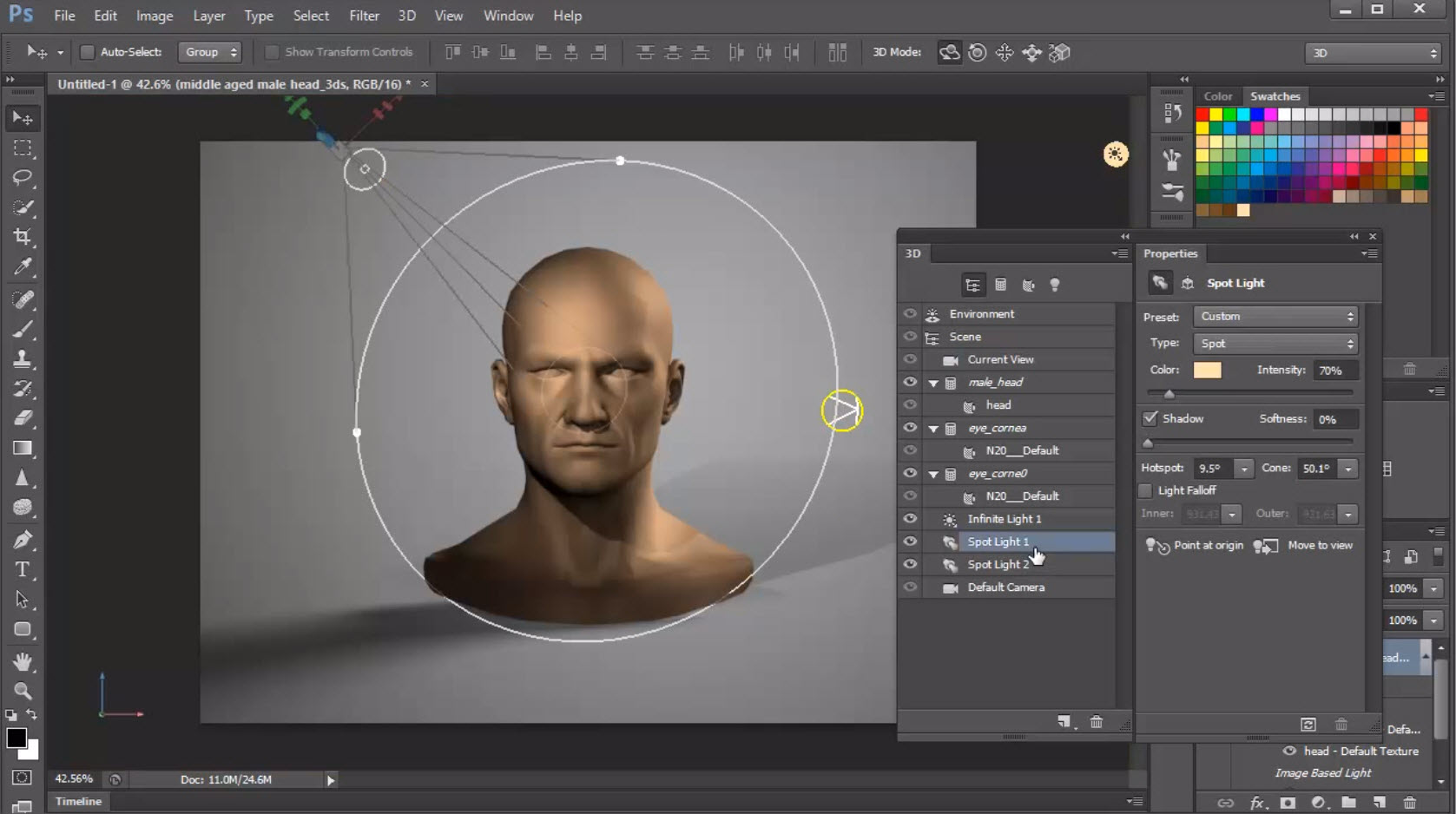
In a continuation of my series on learning 3D in Photoshop CS6 today's topic is lighting your models. Learn the different types of lights that are available in Photoshop's 3D space, and how to control and manipulate them for best effect. [More]

Hand Painted Border Brushes For Photoshop

10/05/2013

I’m a sucker for a border and Photoshop has a raft of ways in which you can create a border from scratch. The only downside with some Photoshop border effects is they can look digitally created and by that I mean they lack the subtle changes and randomness that only a handmade border provides. So here’s a solution. Paint your own borders and turn them into custom brushes. Since Photoshop CS6 brushes can be up to 5000 pixels long, twice the size of Photoshop CS5 and that opens up a lot more creative possibilities. [More]

Smarter Sharpening in Photoshop

07/05/2013

Sharpening traditionally has three phases: capture sharpening, creative sharpening, and output sharpening. In a photographic workflow, Adobe Camera Raw or Lightroom does a fine job of capture sharpening, but where do you go for the rest? Unsharp Mask is tried and true, but no longer the best tool in the toolbox. In this video we’ll look at Smart Sharpen in tandem with Smart Objects for the ultimate in photographic sharpening control. [More]

Using Free Stock Images for Comp Images in Photoshop

06/05/2013

Not to be confused with Layer Comps, Comp images are handy for a few reasons. If you use a stock image site like Fotolia you don’t necessarily want to pay for, and download full res images only for you not to use them. You may also want to put together a rough composite prior to shooting your own images, for inspiration or composition ideas. Using a great plug in you can access thousands of images from within Photoshop at no cost, let me show you how; [More]

Control Exposure, Focus and Subject Focus in Photoshop

03/05/2013

Using the Shadow / Highlight adjustment you can quickly and easily add more contrast and subject focus to an image, then utilising the Iris Blur and its ability to create an Alpha Chanel we can draw more focus to our subject more organically and smoothly. [More]

Faking a Graduated Neutral Density Filter in Camera, Lightroom and Photoshop

01/05/2013

Ever been out and with your camera and see a great shot but when you get to process it the sky is all blown out and no amount of processing can get it back to how it looked? Well, one of the ways to get around this is to use graduated neutral density filters, but you may not always have them with you so there is another way. This alternative method involves a few camera controls and (don’t run away) HDR! Proviso, this method is very good but not 100% foolproof so don’t expect perfect results every time and you need Photoshop CS6 to get the best results. [More]

Photoshop Dramatic Contrast Technique

30/04/2013

This simple but effective technique can take you way beyond simple brightness and contrast adjustments, with precise control over each color independently, using the most unlikely tool for adjusting colors – the black and white adjustment layer. [More]

Auto Correct in Photoshop and ACR

28/04/2013

In this video I take a quick look at where you can find some pretty handy Auto Correct buttons to get your image started. They’re not meant to be a one click solution, although sometimes they are, [More]

Soft Proofing in Lightroom

25/04/2013

How many times have you sent an image from Lightroom to either a printing company or to an online service like Facebook or Flickr and the colours came out all wrong? Now assuming that you have a calibrated monitor (if not, why not?) then the cause of the problem is probably a matter of colour space and Gamut. [More]

Multiple Strokes With Photoshop CS6

19/04/2013

Many Photoshop users have asked how they would be able to add multiple Strokes, or outlines, to an object. This quick tip will show you how it's possible to add 6 outlines to a single object, using Layer Styles, and a new feature in Photoshop CS6. [More]
1 20 21 22 23 24 62
3-9