Did you see...

perfectreplica.io High Quality Best submariner replica Watches Online For Sale All of our Rolex watches are carefully selected.

Tutorial

Photoshop Paste Special Menu Commands

08/04/2013

In this video I take a look at a the Paste Special menu options. Sure, you can use Photoshop never knowing about them but when you do, you’ll be pleased they can be part of your workflow. I’ll be taking a look at; Paste Into Paste Outside and Paste In Place [More]

Photoshop Text on a Circular Path

01/04/2013

Using our Contact Us page The Photoshop Nuts were asked if we could explain how to put text on a circle. This was covered a while back by Michael Hoffman in his post Working With Type On a Path as a written tutorial but I thought I’d create a video for those that prefer to learn that way too. In the video, I also explain a technique for creating concentric circles and explain why you’d want to have two windows displaying one image. [More]

Image Restoration With Photoshop – Getting Rid Of Red Spots

13/03/2013

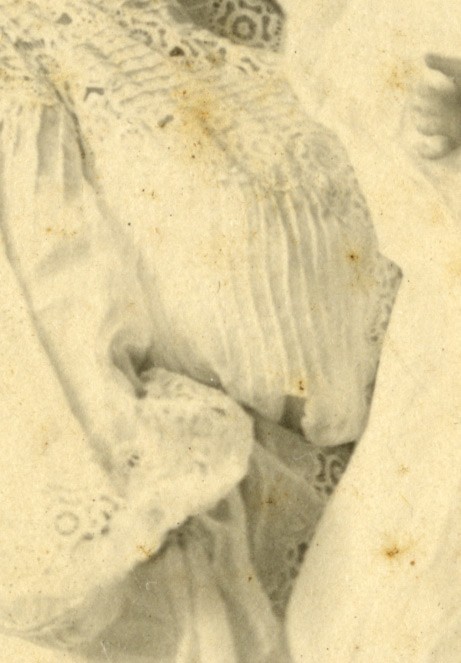
Just like us, photographs get age spots. That’s what those rusty spots are, places where the emulsion is breaking down due to age. Typically the ways they’re dealt with is either with the usual suspects, the clone or patch type tools, or by stripping away the blue and green channels (old school) or using the Black & White Adjustment on one of the red filters. [More]

Hide Menu Items in Photoshop

21/02/2013

Howard Pinksy organises his menus to keep his Photoshop workspace nice and clean.He shows us how to hide those items we don't need, making those we do easier to find. [More]

Creating a Chiseled Text Effect in Photoshop and Photoshop Elements

11/02/2013

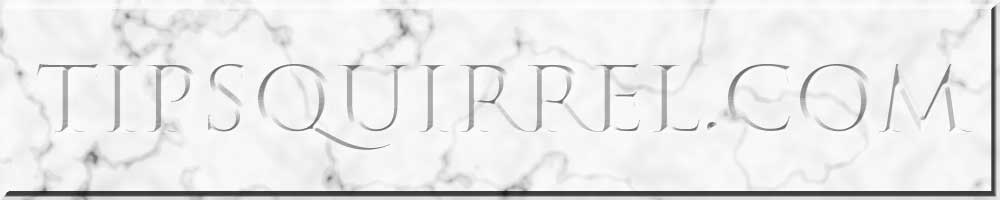
We'll be using Photoshop layer styles to achieve the effect as well as the somewhat obscure Type Mask tool. If you're not familiar with this tool, it's a little like a cross between the Type tool and Quick Mask; we can type our text as usual but when it's committed, instead of creating a layer with the text it creates a selection; this is perfect for the technique as we do not need to work on the text directly. You can follow the original tutorial using the link above but change the dimensions to 1000x200 pixels to create the correct document size. If you don't want to start the image from scratch, it can be downloaded here. [More]

Conditional Actions in Photoshop

30/01/2013

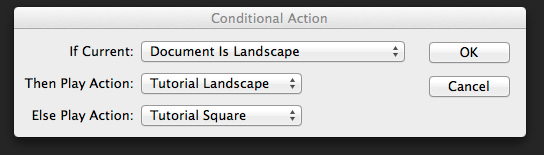
The latest update to Photoshop (only available to Creative Cloud users, don’t blame me talk to Adobe, but I probably agree with you) included something called Conditional Actions. Conditional Actions are a way of adding a clause to an action that will cause another action to run if the clause is applicable or another to run if it isn’t. Clear? No, probably not, so I’ll create a real world example to explain more clearly (hopefully). [More]

Symmetry with Photoshop

18/01/2013

As a photographer symmetry is one of the hardest types of composition you can find. Nature has a habit of avoiding symmetry most of the time. You’ll never walk through a forest and find two identical trees and you’ll never see the left side of the sky perfectly matching the right. However it is dead easy to create symmetrical images using Photoshop, the knack is disguising the fact that you used Photoshop at all. In this video I’ll show you how to mirror an image and then apply a few tweaks to complete the perfect symmetric photo. [More]

Creating a Marble Texture Effect in Photoshop and Photoshop Elements

17/01/2013

In this tutorial we're going to conjure a marble-style texture in Photoshop and Photoshop Elements. This can be used for anything from 3D textures to creating a fancy background for a web banner; as we have done here. The effect hinges around the Clouds filter; yes, the highly versatile filter that's great for creating anything other than clouds. By combining this with further filters, adjustments and layer blend modes, we can achieve a fairly realistic texture quickly and easily. Let's get started. [More]

Photoshop Clipping Masks

14/01/2013

In this video I take a look at Clipping masks. They are really easy to create and have a whole host of applications. This video was made in response to a question in the Google Plus Community; Photoshop and Lightroom Users where I’m one of the moderators. i think it goes without saying, I’d love to see and chat to you there! [More]

Photobooth Template for Photoshop

10/12/2012

For this post I created a very simple template for creating a photo booth type photo strip. Its easy enough to use but there’s a couple of Photoshop techniques in the video too. [More]

Opening Jpeg and Tiff Files in Adobe Camera Raw

26/11/2012

I was recently asked how I was opening Jpeg files in Adobe Camera Raw (ACR). The reader told me that they had never been able to do this and wondered if this was a clever ‘Extra’ in Photoshop. Not at all is the answer so let me explain how it’s done, its just a setting hidden away. [More]
1 3 4 5 6 7 16
3-9