Did you see...

perfectreplica.io High Quality Best submariner replica Watches Online For Sale All of our Rolex watches are carefully selected.

March 2014

Photoshop Character Palette – Fotolia Beginner Guide Series

28/03/2014

I thought I’d take the opportunity this week to tell you about a series I’ve been producing for our friends at Fotolia. This brilliant stock images site has been a supporter of TipSquirrel.com for some time and I’m delighted to be making these Photoshop for Beginners tutorials for them. In the latest tutorial I take a look at the Character Palette and discover how you can manipulate live text. [More]
A Portable Lightroom Catalog

25/03/2014

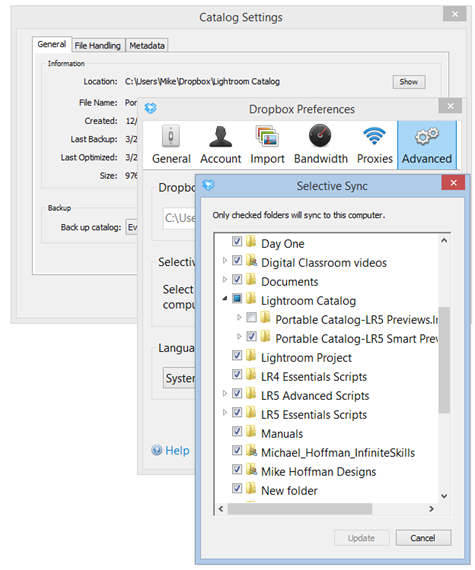
Lightroom 5 brings with it a great new feature in Smart Previews. Combine the capabilities of Smart Previews (the ability to develop and export your images based on the relatively small file size of the Smart Preview) together with the convenience and decreasing cost of cloud storage systems (such as DropBox or Google Drive) and you have some interesting ways of creating a portable, no-hassle catalog solution. [More]

Animate Photoshop Layer Styles to Make a Channel Bug

21/03/2014

A channel bug sits in a corner of the screen and acts as a little 'watermark' or ident for your video. They're really easy to make and just as easy to animate using Photoshop CC or Photoshop Extended. In this video I show you how! [More]

Pen Tool in Photoshop–Putting it all Together

18/03/2014

In this video, we step through the process of extracting an object from a busy background – one that doesn’t work well at all with the quick selection too, nor any of the pixel based selection tools. The Pen Tool is the right tool for this job, and we’ll step through the practical use of the Pen Tool for this [More]

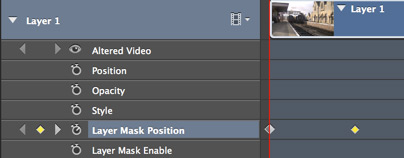
Intro to Keyframes in Photoshop : Animating Masks

14/03/2014

In this video I take a short video clip and, using masks and keyframes, make a simple introduction to the video. Keyframes are a major part of video editing and are used extensively through the whole Creative Cloud and Creative Suite. [More]

Using Lightroom on Two Computers

12/03/2014

My main Lightroom catalog is on a desktop Windows machine in my home studio, but I travel with a MacBook Pro, and use the laptop computer for working with Lightroom on the road. In this video, I'll discuss the way I merge photos from my remote shoots back into my main Lightroom catalog. In order to do this, I use Lightroom's "Export as Catalog" and "Import from another Catalog" features to transfer and merge my two separate catalogs into one. Keep in mind that this is one of a number of possible strategies, but it is the one that works for me. [More]

Quick Soft Glow High Key High Contrast Effect in Photoshop

07/03/2014

In this video I take a standard portrait and quickly add an effect using Filter Gallery and a mask. I fully appreciate its not going to be something you use regularly on your portrait photos, but its worth adding the masking technique used here to your Photoshop toolbox. [More]

Workshop – Lighting and Editing for Portrait

06/03/2014

This full day workshop will encourage and support attendees to experiment with studio lighting of all kinds. There'll be both flash and continuous lighting available to light the two models. Once you've captured your images you can take them to a spacious classroom adjacent to the studio where you can use Adobe Photoshop to edit them. Two trainers will be on hand, Eric Renno an Adobe Certified Expert in Photoshop and Sian DeCiantis, a Media Lecturer. [More]

Pen Tool in Photoshop – Converting Points

04/03/2014

We continue to progress through the tricks and details of using the Pen Tool in Photoshop, and today we look at ways of converting anchor points from corners, to smooth curves, to cusp points and back. This final skill, combined with what we’ve learned in the previous videos, will give you everything you need to manage creating and editing of virtually any complex path in any image. [More]

Enhancing Hair – A Photoshop Workflow Example

01/03/2014

In this workflow example I take take a look at enhancing hair, and what better way than with this wonderful sloth? You'll see my workflow for this image from start to finish including Adobe Camera Raw and finishing touches in Photoshop. [More]
3-9